AI Watermark Remover: How to Clean Up Your Own Images Without Crossing the Line
An ai watermark remover can turn a usable photo into a clean one in minutes, but only when it is used on the right image. If the picture is yours, or you have clear permission to edit it, these tools can remove a logo, a date stamp, a test overlay, or an AI generator badge and rebuild the area behind it. If the picture belongs to someone else, the same click can cross a legal and ethical line. This guide keeps that distinction at the centre, explains how the technology actually works, and shows a careful workflow for your own images.
Start With Ownership, Not With the Tool
Before you search for a watermark remover free option, ask one simple question: do you own this image, or do you have permission to change it? Your own photos, screenshots of your own work, a licensed image your licence allows you to edit, and an AI image you generated yourself are the straightforward cases. A stock preview, a photographer’s portfolio image, or a screenshot taken from someone else’s video is not.
Removing someone else’s watermark without permission can violate their rights, even if the tool makes it easy. A watermark is often there to show ownership, to mark a preview that has not been bought, or to identify AI generated content. Taking it off does not transfer ownership, does not create a licence, and does not make reuse fair or lawful. If you are unsure, keep the mark in place and ask the owner, or buy the licensed version.
There is one related point worth remembering for AI outputs. Removing a visible badge from your own AI image or video does not necessarily remove invisible provenance information, such as embedded metadata, that may still identify it as AI generated. Platforms, clients, and publishers may still require disclosure, so keep any disclosure that applies to your project.
How an AI Powered Watermark Remover Rebuilds a Picture
An ai powered watermark remover does not simply erase pixels and leave a hole. Most modern tools use inpainting. You mark the watermark, and the model studies the pixels around it, then paints in a plausible replacement based on that surrounding texture, colour, and pattern. A plain sky, a blurred background, or a smooth wall is usually rebuilt cleanly. A face, fine text, a complex pattern, or a busy street scene is much harder, because the tool has to guess detail that was hidden underneath the mark.
That guess is the main limit to understand. The result can look natural without being a true recovery of the original. If a watermark covered an eye, a product label, or a small but important detail, the clean version may invent something that looks right but is not accurate. For personal photos and social posts, that is often acceptable. For product listings, evidence, journalism, or any image where accuracy matters, it is not. In those cases, use the original unmarked file if you have it.
Tools differ in how you select the mark. Some ask you to brush over it by hand, which gives you control over awkward shapes. Others try to detect text or logos automatically, which is faster for a clear corner badge but can miss faint or tilted marks. A few process the image in your browser, so the file does not need to be uploaded to a server, while others upload it for processing. If you are working with private client photos, that privacy difference matters, so check it before you upload anything sensitive.
How to Remove a Watermark From Your Own Image
Learning how to remove watermark marks well is mostly about preparation and checking, not about finding a magic button. The steps below work for most browser tools, and they help you avoid the faint outline that gives away a rushed edit.

- Work from the best copy you have. Use the highest resolution original, not a compressed copy that has already been shared or screenshotted. Compression makes edges softer and inpainting harder to blend.
- Make a backup first. Save the original in a separate folder before you edit. If the result looks wrong at full size, you can start again instead of editing an already edited file.
- Mark slightly beyond the edges. Cover the whole watermark, including faint edges and shadows, with a small margin around it. A missed sliver of text is the most common reason a result still looks marked.
- Preview at 100 percent. Do not judge the result only in a small preview. Zoom in and check the rebuilt area for smearing, repeated patterns, colour shifts, or a ghost of the old letters.
- Run a second pass only if needed. If a faint trace remains, mark just that trace and process again. Repeated full passes can soften the whole area and make it look artificial.
- Export and compare. Put the original and the cleaned version side by side. If the cleaned area draws the eye, it is not finished, even if the watermark itself is gone.
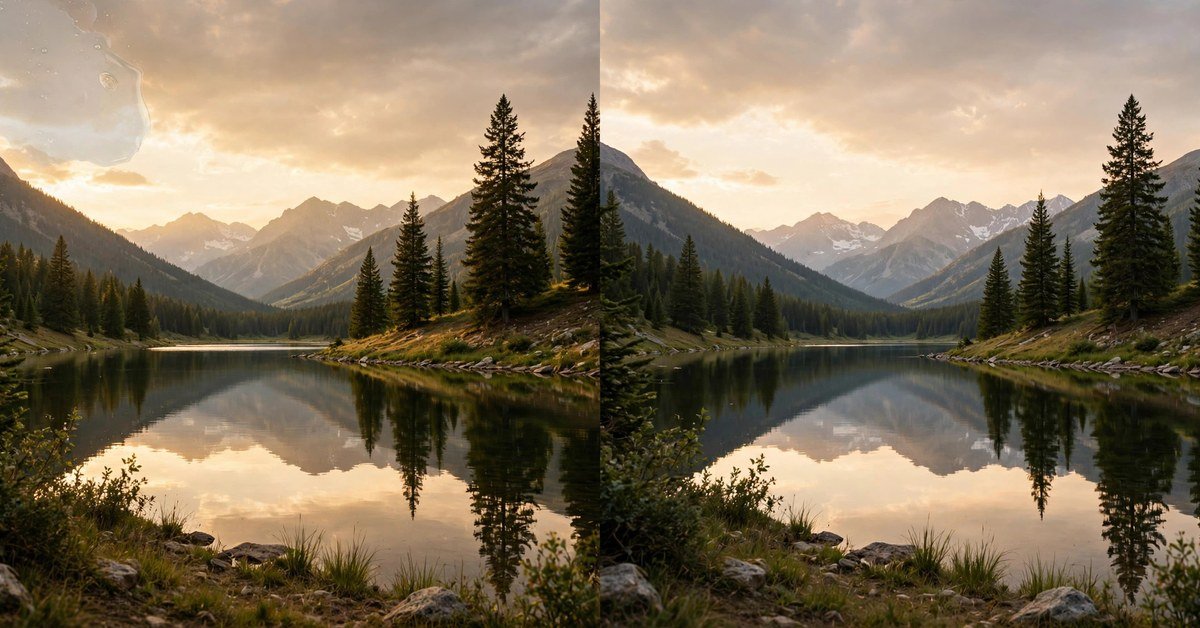
Two common cases deserve extra care. First, when you want to remove watermark image marks that sit across a face or a detailed object, try a smaller brush and work in sections rather than covering the whole area at once. Second, when a watermark repeats across the whole picture, as in a stock preview grid, do not expect a clean result. A tiled mark hides too much of the image for inpainting to rebuild reliably, and in the stock case you should buy the licence instead.
Choosing the Best Watermark Remover for Your Case
There is no single best watermark remover for every image, because the right choice depends on the mark, the image, and your privacy needs. Use these questions to narrow it down quickly.
- Is the mark small and in a corner? A free browser tool with brush selection or auto detection is usually enough, and it is the fastest way to test a result.
- Is the image private or client work? Prefer a tool that processes in your browser or states clearly that uploads are deleted after processing. Avoid uploading sensitive work to a tool with unclear storage terms.
- Is the mark large, tilted, or semi transparent? Look for a tool that handles large areas or offers a higher quality mode. Expect a longer processing time and check the result more closely.
- Do you need many images cleaned? Free limits, file size caps, and daily quotas matter more than a single impressive demo. Check those limits before you commit to a workflow.
- Did the result soften the picture? A separate upscale or sharpening pass can help, and our guide on how to upscale an image without losing quality explains that step. If the picture is also blurry, see how to make a blurry picture clear before you judge the watermark removal itself.
For a concrete starting point, ClearPix runs in the browser with no sign up and describes its inpainting approach openly, while MinoRemove also emphasises browser based processing and brush or rectangle selection. Treat both as starting points to test on your own image, not as guarantees, and check their current limits and terms before use, since free tools change their plans often.
AI Text Watermarks and Sora Watermarks
Many people searching for how to remove ai text watermarks are dealing with a small badge or label added by an image generator to their own output. The workflow is the same as above: confirm it is your output, mark the badge fully, preview at full size, and keep any disclosure your platform or client requires. If the badge sits on a plain background, the result is usually clean. If it overlaps a detailed subject, expect some softening.
Video is harder. If you are wondering how to remove sora ai watermark marks from a clip you generated, remember that a Sora style watermark can move around the frame, so a single static crop or mask will not catch it for the whole clip. A video tool needs to track the mark across frames and rebuild each frame underneath it, and results vary with motion and texture. Before you do that, check the provider’s current terms for your plan, because some plans offer watermark free downloads directly, which is cleaner than editing the mark out afterwards. And again, this applies only to videos you created or have permission to edit.
That distinction also answers the broader question of how to remove ai watermark marks in general. The technical answer is inpainting, and the responsible answer is ownership first. A watermark remover ai tool is a cleanup tool for your own work, not a way to claim or reuse someone else’s work.
A Quick Checklist Before You Export
Use this list as a final pass, especially before you post a cleaned image publicly or send it to a client.
- You own the image or have written permission to edit it.
- The original is backed up separately.
- The watermark, including faint edges, is fully covered in the selection.
- The rebuilt area has been checked at full size, not just in a thumbnail.
- No important detail has been invented or distorted in a way that misleads the viewer.
- Any AI disclosure, credit, or licence note that still applies has been kept.
- The exported file is in the format and size your platform needs, without a new watermark added by the tool itself.
Questions Readers Ask About AI Watermark Removal
Is it legal to remove a watermark from a photo?
It depends on ownership and permission. Removing a watermark from your own photo, or from an image you have permission to edit, is a normal cleanup task. Removing someone else’s watermark to reuse their photo without permission can infringe their rights, and a watermark on a stock preview does not become yours because you removed it.
Can an AI watermark remover restore what was underneath?
Not truly. It reconstructs a plausible version of the hidden area from surrounding pixels. That looks convincing on simple backgrounds, but it cannot recover detail that was never visible, so check detailed areas carefully before you rely on the result.
Why does a faint outline sometimes remain?
Usually the selection missed a faint edge, a shadow, or a semi transparent part of the mark. Mark slightly beyond the visible edges, preview at full size, and run a small second pass on the remaining trace rather than reprocessing the whole image.
Are free watermark removers safe for private photos?
Some are, and some are not, so check before uploading. Browser based tools that keep processing on your device are the most private option for sensitive work. For server based tools, read the storage and deletion terms, and avoid uploading anything you would not want stored elsewhere.
Can I remove a watermark from a video the same way as a photo?
The idea is similar, but video is more demanding because the mark may move and every frame must be rebuilt consistently. For your own clips, a dedicated video tool that tracks the mark is a better choice than a photo tool, and a watermark free download from the provider, where offered, is cleaner still.
Clean Up Your Own Images, Leave Other People’s Marks Alone
A good watermark remover is a practical tool when it is used within its limits: your own images, a careful selection, a full size preview, and an honest check of what the AI rebuilt. It is not a shortcut to free stock photos, and it is not a way to hide where an image came from. Keep the original backed up, keep the disclosure that still applies, and let the cleaned image stand on its own quality. Done that way, the result looks natural for the right reason, because the edit was careful, not because the mark was simply hidden.

- AI Watermark Remover: How to Clean Up Your Own Images Without Crossing the Line - November 4, 2026
- 15 Best AI Tools for Research, Matched to Every Step of the Job - November 3, 2026
- Best Free AI Headshot Generator: 5 Tools That Are Actually Free (2026) - November 3, 2026