Android OS Security Updates: Everything You Need to Know in 2026
Android OS security updates have never mattered more than they do in 2026. With mobile devices handling banking, healthcare data, corporate email, and personal identity documents simultaneously, the security patch level on your Android device is no longer a background technical detail it is a direct measure of how protected you are against the threats actively targeting your data right now. This guide breaks down how Android security updates work, why they frequently arrive late or not at all depending on your device, what the latest patches cover, and what to do if your device has stopped receiving them entirely.
How Android OS Security Updates Actually Work
Understanding the Android security update delivery chain explains why two people using different Android phones can have dramatically different patch levels even in the same month. Google releases monthly security bulletins that cover vulnerabilities across Android’s core code, but those patches then pass through device manufacturers Samsung, Xiaomi, OnePlus, Google itself and in many cases through mobile carriers before reaching your device.
- Google publishes a monthly Android Security Bulletin covering critical, high, moderate, and low severity vulnerabilities
- Device manufacturers receive patches 30 days before public disclosure to prepare device-specific builds
- Carrier-locked devices add another review layer that can delay patches by weeks or months
- Google Pixel devices receive patches on the same day as public bulletin release with no intermediary delay
This fragmented delivery chain is the root cause of Android’s persistent security patch disparity a problem that has improved but not disappeared in 2026, particularly on budget and mid-range devices from manufacturers with smaller software teams.
What the 2026 Android Security Patches Actually Fix
The monthly Android OS security updates in 2026 have addressed increasingly sophisticated vulnerability categories compared to previous years. The shift toward AI-integrated Android features has expanded the attack surface, introducing new vulnerability types that didn’t exist in earlier Android versions. According to the official Android Security Bulletin for June 2026, Google confirmed that a zero-day vulnerability tracked as CVE-2025-48595 was under active limited exploitation reinforcing why timely Android OS security updates are genuinely critical rather than optional maintenance.
- Zero-click vulnerabilities that require no user interaction to execute malicious code on a targeted device
- Bluetooth and Wi-Fi stack exploits enabling remote code execution without physical device access
- Kernel privilege escalation bugs allowing malicious apps to gain system-level permissions without approval
- Media framework vulnerabilities triggered by simply receiving a specially crafted image or video file
The May 2026 Android Security Bulletin addressed a critical System component vulnerability that could lead to remote code execution with no user interaction required a zero-click threat affecting Android 14, 15, and 16 simultaneously. The June bulletin followed with the confirmed zero-day exploit, underscoring why monthly patch cadence is non-negotiable for any device handling sensitive data.
Which Android Devices Get Updates First in 2026
Patch timing varies enormously across the Android ecosystem, and knowing where your device falls in the update hierarchy directly affects how long you are exposed to known vulnerabilities after Google’s monthly bulletin releases.
- Google Pixel 6 through Pixel 9 series receive patches on the first Monday of every month the fastest delivery in the ecosystem
- Samsung Galaxy S series and Z Fold devices receive monthly patches within one to two weeks of Google’s release
- Samsung mid-range A series devices receive quarterly patches rather than monthly updates
- Most budget Android devices from smaller manufacturers receive patches every six months or less frequently
For users who prioritize security, this update frequency difference is one of the most practically significant factors when choosing an Android device more significant than most hardware specifications that dominate buying decisions.
Android OS Security Updates vs Apple iOS: The Real Comparison
The comparison between Android OS security updates and Apple’s iOS patch delivery reveals structural differences in how each ecosystem handles security at scale. Apple controls both the hardware and software across its entire device lineup, eliminating the manufacturer and carrier delay layers that affect Android. For a detailed look at how Apple’s security update system works on macOS and the differences that matter for cross-platform users, this macOS security update guide for Apple Silicon covers the full picture of Apple’s patch delivery approach in 2026.
- Apple pushes security patches to all supported devices simultaneously on the same day worldwide
- Android’s fragmented ecosystem means the same vulnerability can remain unpatched on millions of devices for months
- Google’s Project Mainline partially addresses this by updating core Android modules through the Play Store independently
- Pixel devices in 2026 now receive five years of OS updates and seven years of security patches
Project Mainline: Google’s Answer to Patch Fragmentation
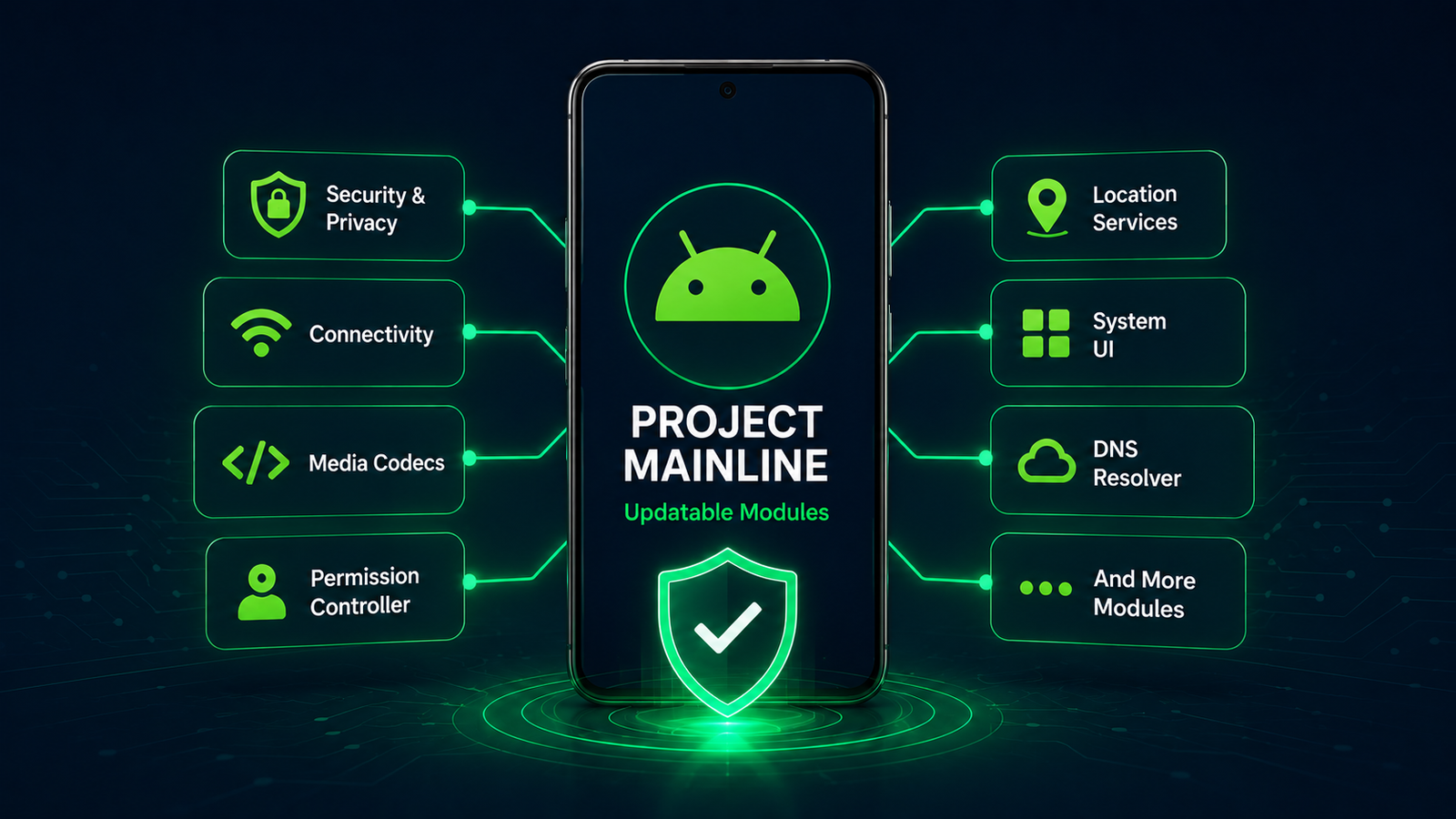
Google’s Project Mainline now called Android Updatable Modules represents the most significant structural improvement to Android OS security updates in recent years. By separating critical Android components from the core OS and updating them through the Play Store, Google can push security fixes to supported devices regardless of whether the manufacturer has released a full system update.
- Over 30 Android system components now update independently through Google Play including DNS resolver, media codecs, and permission controller
- Mainline updates reach devices running Android 10 and later without manufacturer intervention required
- Critical vulnerability patches in supported modules now reach billions of devices within days rather than months
- Manufacturers cannot delay or block Mainline module updates, removing the carrier and OEM bottleneck for covered components
How to Check Your Android Security Patch Level Right Now
Knowing your current Android OS security update status takes under 30 seconds and immediately tells you how exposed your device is to publicly known vulnerabilities. Navigate to Settings, then About Phone, then Android Version, where your Security Patch Level appears as a date formatted as month and year.
- A patch level within 30 days of the current date indicates your device is receiving timely updates
- One to three months behind is common for mid-range devices and represents moderate exposure risk
- Three to six months behind means your device has known, publicly documented vulnerabilities that haven’t been patched
- More than six months behind is a significant security concern that should factor into your device replacement timeline
For users who also manage Apple devices alongside Android hardware, understanding the parallel security update processes on both platforms is essential. This OS X security updates resource provides a comprehensive reference for Apple’s patch history and current security update status that complements the Android picture covered here.
What To Do When Your Android Device Stops Receiving Updates
Android devices typically reach end-of-life for security updates between three and seven years after release depending on the manufacturer. When Android OS security updates stop arriving, the practical options narrow considerably but don’t disappear entirely.
- Custom ROM installation LineageOS and GrapheneOS provide continued security patches for many end-of-life devices
- Network-level protection enterprise-grade VPNs and DNS filtering reduce exposure even on unpatched devices
- App permission auditing removing unnecessary app permissions limits what a potential exploit can access
- Sideloading elimination avoiding app installation from outside the Play Store removes the highest-risk attack vector on unpatched hardware
For users whose devices have stopped receiving patches and who handle sensitive data professionally, device replacement is genuinely the most secure long-term solution rather than attempting to compensate for known OS-level vulnerabilities through behavioral changes alone.
The Best Android Devices for Security Updates in 2026
Choosing an Android device with the strongest security update commitment in 2026 means evaluating manufacturer track records alongside hardware specifications. According to security reporting on the May 2026 zero-click vulnerability confirmed by Google, devices that had not received their monthly patch were exposed to a critical remote shell access exploit requiring no user interaction a real-world demonstration of why manufacturer update commitment matters as much as hardware quality when selecting a device.
- Google Pixel 8 and 9 series: Seven years of guaranteed security patches through 2031 and 2032 respectively
- Samsung Galaxy S24 and S25 series: Seven years of OS and security updates with monthly patch delivery for flagship models
- OnePlus 13 and Nothing Phone 3: Four years of OS updates and five years of security patches
- Most other Android manufacturers: Two to three years of security patches with inconsistent delivery schedules throughout
Final Analysis
Android OS security updates in 2026 tell a more complex story than a single monthly patch level number suggests. The underlying delivery infrastructure manufacturer timelines, carrier review processes, Project Mainline module updates, and manufacturer-specific support commitments determines whether a given Android device is genuinely protected or carrying known vulnerabilities regardless of how premium the hardware is.
The most practical steps any Android user can take are checking their current patch level today, understanding their device manufacturer’s support timeline, and factoring security update commitment into every future device purchase decision as seriously as camera quality or battery life. In an environment where a single unpatched vulnerability can expose banking credentials, health data, and professional communications simultaneously, patch level is not a technical footnote it is the baseline measure of whether your most personal device is actually working in your interest.
Frequently Asked Questions
How often should Android OS security updates arrive?
Flagship devices from Google and Samsung should receive monthly updates. Mid-range devices typically receive quarterly patches. Budget devices often receive updates every six months or less. Any device more than three months behind its manufacturer’s stated patch schedule warrants investigation into whether updates have been discontinued ahead of schedule.
Can I force my Android device to receive security updates faster?
Not directly. Google controls the patch release schedule, manufacturers control device-specific build preparation, and carriers control final approval on locked devices. Switching to an unlocked device eliminates the carrier delay layer. Switching to a Google Pixel eliminates the manufacturer delay layer entirely, providing the fastest possible Android OS security update delivery available.
Are Android OS security updates separate from Android OS version upgrades?
Yes. Security patches arrive monthly and fix specific vulnerabilities without changing the Android version number or user interface. OS version upgrades bring new features and interface changes alongside security improvements and arrive one to two times per year on supported devices. A device can be on an older Android version but still receive current security patches if the manufacturer continues supporting it.
Is it safe to use an Android device that no longer receives security updates?
It depends entirely on how the device is used. A device handling only low-sensitivity tasks with minimal app permissions and no access to financial or health accounts carries relatively lower risk. A device used for mobile banking, corporate email, healthcare apps, or sensitive professional data should be considered a security liability once patches stop, and replacement should be treated as a practical necessity rather than an optional upgrade.

- How to Add Captions to Short Videos That People Actually Read - October 8, 2026
- 10 Step AI Search Content Optimization Checklist - October 6, 2026
- Competitor Visibility Tracker: How to Monitor Search and AI Visibility - August 22, 2026