
Budget Friendly Mechanical Keyboard: The Best Picks and Buying Guide for 2026
A budget friendly mechanical keyboard used to mean accepting obvious compromises mushy switches, flimsy construction, and frustrating connectivity issues. That trade-off no longer holds in 2026. The mechanical keyboard market has undergone a significant democratization, with manufacturers delivering genuine quality at price points that were unthinkable just three years ago. Whether you’re a programmer logging ten-hour coding sessions, a student looking for a reliable study companion, or a gamer who wants tactile feedback without spending a fortune, there has never been a better time to invest in a budget friendly mechanical keyboard that actually performs.
What Makes a Mechanical Keyboard Worth Buying on a Budget
Before jumping into specific recommendations, it’s worth understanding what separates a genuinely good budget friendly mechanical keyboard from one that simply looks affordable in a product listing. The three most critical factors are switch quality, build material, and firmware stability.
Switches are the core mechanical component they determine how typing feels, how loud the keyboard is, and how many keystrokes it can survive before degrading. A budget friendly mechanical keyboard with low-quality switches will feel worn within months. Reputable switch brands like Gateron, Kailh, and Outemu now produce switches that rival Cherry MX performance at a fraction of the licensing cost, meaning many affordable keyboards use switches that are genuinely excellent rather than cheap imitations.
Top Budget Friendly Mechanical Keyboards to Consider in 2026
The following keyboards consistently receive high marks across typing communities, review platforms, and productivity forums in 2026:
- Keychron C3 Pro: An outstanding budget friendly mechanical keyboard for beginners, offering hot-swap support, USB-C connectivity, and Gateron Red or Brown switches at under $45. The south-facing RGB LEDs are a bonus at this price tier.
- Epomaker TH80 Pro: A compact 75% layout with Bluetooth and wired dual-mode, gasket-mounted plate for improved sound profile, and pre-lubed switches. A remarkable budget friendly mechanical keyboard for those who want a premium feel without premium pricing.
- Akko 3068B Plus: Wireless, tenkeyless, and available with a wide range of switch options including Akko’s own CS series. Consistently cited as one of the best value propositions in the budget friendly mechanical keyboard space.
- Royal Kludge RK61: A compact 60% board with wireless capability that remains one of the most recommended entry-level options for gamers and minimalist desk setups.
Each of these represents what the modern budget friendly mechanical keyboard category looks like not stripped-down compromises, but thoughtfully engineered products with genuine feature sets.
Switch Types Explained for Budget Buyers
Switch selection is the single most personal decision when choosing a budget friendly mechanical keyboard. Getting it wrong means a keyboard that feels wrong every time you sit down to type. The three main categories to understand are:
Linear switches (Red, Yellow, Speed) travel smoothly from top to bottom with no tactile bump or audible click. They’re preferred by gamers who need rapid actuation and quiet typists sharing office or study spaces. Gateron Yellows are widely regarded as the best linear switch in the budget friendly mechanical keyboard segment.
Tactile switches (Brown, Clear, Tactile) provide a noticeable bump at the actuation point physical feedback that tells your fingers a keystroke has registered without the noise of a clicky switch. These are the most versatile choice for a budget friendly mechanical keyboard used across both work and gaming.
Clicky switches (Blue, Green) produce an audible click and tactile bump simultaneously. Satisfying for dedicated typists, but loud enough to create friction in shared environments. Not ideal for every budget friendly mechanical keyboard use case, but beloved by writers and programmers who type alone.
Hot-Swap Support: Why It Matters on a Budget Keyboard
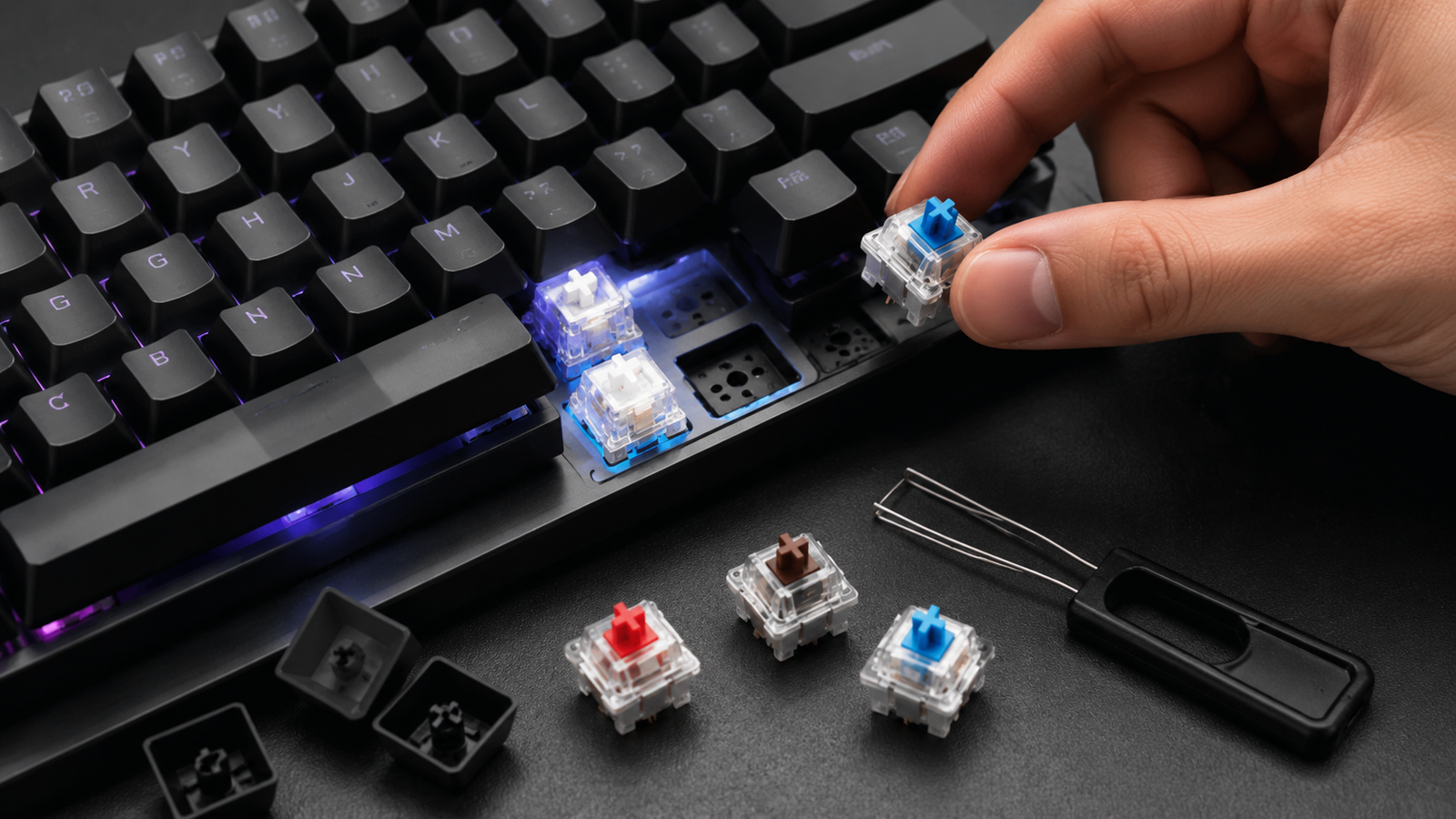
Hot-swap capability the ability to remove and replace switches without soldering has become increasingly common even in the budget friendly mechanical keyboard category. This feature transforms an affordable keyboard into a long-term investment. Instead of replacing the entire board when switches wear out or your preferences change, you simply pull out the old switches and press in new ones.
For anyone new to mechanical keyboards, hot-swap support means the freedom to experiment with different switch feels over time without additional cost beyond the switches themselves. When evaluating any budget friendly mechanical keyboard, hot-swap should be near the top of your checklist.
Form Factors: Choosing the Right Layout for Your Setup
The physical size of a budget friendly mechanical keyboard significantly affects both desk ergonomics and price. Larger boards cost more to manufacture and ship, which is why compact layouts dominate the value tier.
- Full-size (100%): Includes numpad ideal for data entry professionals but rare in the budget friendly mechanical keyboard market due to higher material costs
- Tenkeyless (TKL/80%): Removes the numpad for a cleaner desk footprint while retaining function row and navigation cluster the most versatile layout
- 75%: Tightly packed with function row and arrow keys intact popular for the combination of compactness and functionality
- 65%: Drops the function row, retains arrows common in budget friendly mechanical keyboard gaming builds
- 60%: Minimal layout relying on layers for function access cheapest to produce and widely available under $40
Sound Profile and Desk Mat Pairing
One aspect of the budget friendly mechanical keyboard experience that surprises new buyers is how much the acoustic environment matters. Even an excellent keyboard can sound hollow or clacky on a bare desk. A simple desk mat available for under $20 dramatically improves the sound profile by absorbing vibrations from the keyboard’s base.
Many budget friendly mechanical keyboards in 2026 also come with foam padding pre-installed between the PCB and bottom case, a feature that was previously exclusive to premium builds. This internal dampening reduces the high-pitched “ping” sound that cheap keyboards are notorious for, producing a more satisfying thock that rivals boards costing three times as much.
Where to Research and Buy a Budget Friendly Mechanical Keyboard
The mechanical keyboard community is one of the most active and helpful in consumer tech. Reddit communities like r/MechanicalKeyboards and r/BudgetKeebs provide real-world impressions from thousands of users across every price tier. For expert reviews with objective sound and feel testing, RTINGS.com’s keyboard review database offers some of the most methodologically consistent evaluations available online.
When purchasing, direct brand stores and established marketplaces tend to offer the best combination of price and warranty support. For broader gadget and tech buying coverage beyond keyboards, the gadgets section at Techlspro covers the latest in consumer hardware worth watching.
Keycaps: Upgrading Your Budget Keyboard Without Breaking the Bank
Most budget friendly mechanical keyboards ship with ABS plastic keycaps functional but prone to shine over time and less satisfying under finger than PBT alternatives. The good news is that keycap sets are independently upgradeable and affordable. PBT keycap sets from brands like Akko, HK Gaming, and YMDK are widely available for $20–$35, transforming the feel and aesthetic of any budget friendly mechanical keyboard considerably.
Double-shot PBT legends where the character is molded through both layers of plastic rather than printed on the surface never fade, making them a worthwhile upgrade investment for any budget friendly mechanical keyboard intended for long-term daily use. According to the Keychron product blog, keycap material and profile choice is consistently rated among the top factors affecting long-term keyboard satisfaction more impactful than switch type alone for many typists.
Closing Perspective
The budget friendly mechanical keyboard category in 2026 represents one of the most compelling value stories in consumer technology. Features that once defined premium builds hot-swap PCBs, gasket mounting, wireless connectivity, PBT keycaps, and quality switches are now accessible at price points that make mechanical keyboards a realistic choice for virtually anyone. Whether you’re purchasing your first mechanical board or expanding a multi-keyboard setup on a controlled budget, the options available today deliver genuine performance, long-term durability, and typing satisfaction that justifies every dollar spent. The era of paying a premium for quality mechanical input is over and for budget-conscious buyers, that’s very good news.
Frequently Asked Questions
What is a reasonable price for a good budget friendly mechanical keyboard?
In 2026, you can find genuinely high-quality budget friendly mechanical keyboards between $35 and $80. Below $35, quality control and switch longevity become more inconsistent. Above $80, you enter the mid-range tier where premium materials and advanced features like gasket mounting become standard.
Is a budget friendly mechanical keyboard good enough for professional typing?
Absolutely. Many professional writers, developers, and customer support specialists use budget friendly mechanical keyboards as their daily drivers. Switch quality in the $40–$70 range from brands like Gateron and Kailh is comparable to far more expensive options, and the typing experience easily supports eight-plus-hour workdays without fatigue.
Are wireless budget friendly mechanical keyboards reliable?
Yes, significantly more so than just two years ago. Most wireless budget friendly mechanical keyboards in 2026 use 2.4GHz dongles for low-latency connections suitable for gaming, alongside Bluetooth for device switching. Battery life typically ranges from two to six weeks on a single charge depending on RGB usage.
How long does a budget friendly mechanical keyboard typically last?
Most mechanical switches are rated for 50 to 100 million keystrokes. For the average typist, that translates to a decade or more of daily use before switch degradation becomes noticeable. The keyboard’s longevity beyond the switches depends on build quality — aluminum cases outlast plastic, and hot-swap PCBs extend keyboard life indefinitely through component replacement.
Should I get a 60% or TKL layout for my first budget keyboard?
If you regularly use function keys, arrow keys, or a number row for shortcuts, TKL is the safer choice for a first budget friendly mechanical keyboard. The 60% layout requires adapting to layered key functions, which has a learning curve. Most beginners find TKL or 75% layouts the easiest transition from standard membrane keyboards.

- How to Add Captions to Short Videos That People Actually Read - October 8, 2026
- 10 Step AI Search Content Optimization Checklist - October 6, 2026
- Competitor Visibility Tracker: How to Monitor Search and AI Visibility - August 22, 2026